 Sequence
Sequence for mix engineers
Deliver your latest mix straight into the album. The moment you send it, everyone working on the record hears it in the running order, on their phones and Macs, and your earlier mixes stay a click away.
Sequence for Mac
For delivering mixes and hearing every version of every song. macOS 13 or later, on Apple silicon or Intel.
Download for MacA disk image, signed and notarized by Apple: open it and drag Sequence into Applications. It keeps itself up to date.
Sequence for iPhone
Optional, for listening anywhere: the album, every version, the notes.
Get it on TestFlightInstalls through Apple’s free TestFlight app.
How it works
-
Install and sign in
Open Sequence and sign in with Apple or Google, right on its home screen. Signing in happens in your browser; Sequence never sees a password. If you also use Sequence on an iPhone, sign in with the same account on both.
-
Open the link you were sent
Click the invitation link, then Open in Sequence. Or, in Sequence, choose File › Join Album… and paste the link. Give the name you want shown beside your mixes.
The album then appears under Shared with you on Sequence’s home screen. Click it to open its window.
To deliver mixes, your link has to be one that lets you edit. If the album’s window says “You can listen”, ask for a new link.
-
Listen
Each song shows the version everyone hears now. Open a song’s versions to see every mix so far: who delivered it, when, and the note that came with it. Any version plays, and an earlier one can be put back in use for everyone. Play the Album plays the versions in use, in running order.
Notes left for everyone sit under each song, at the moment in the song they’re about.
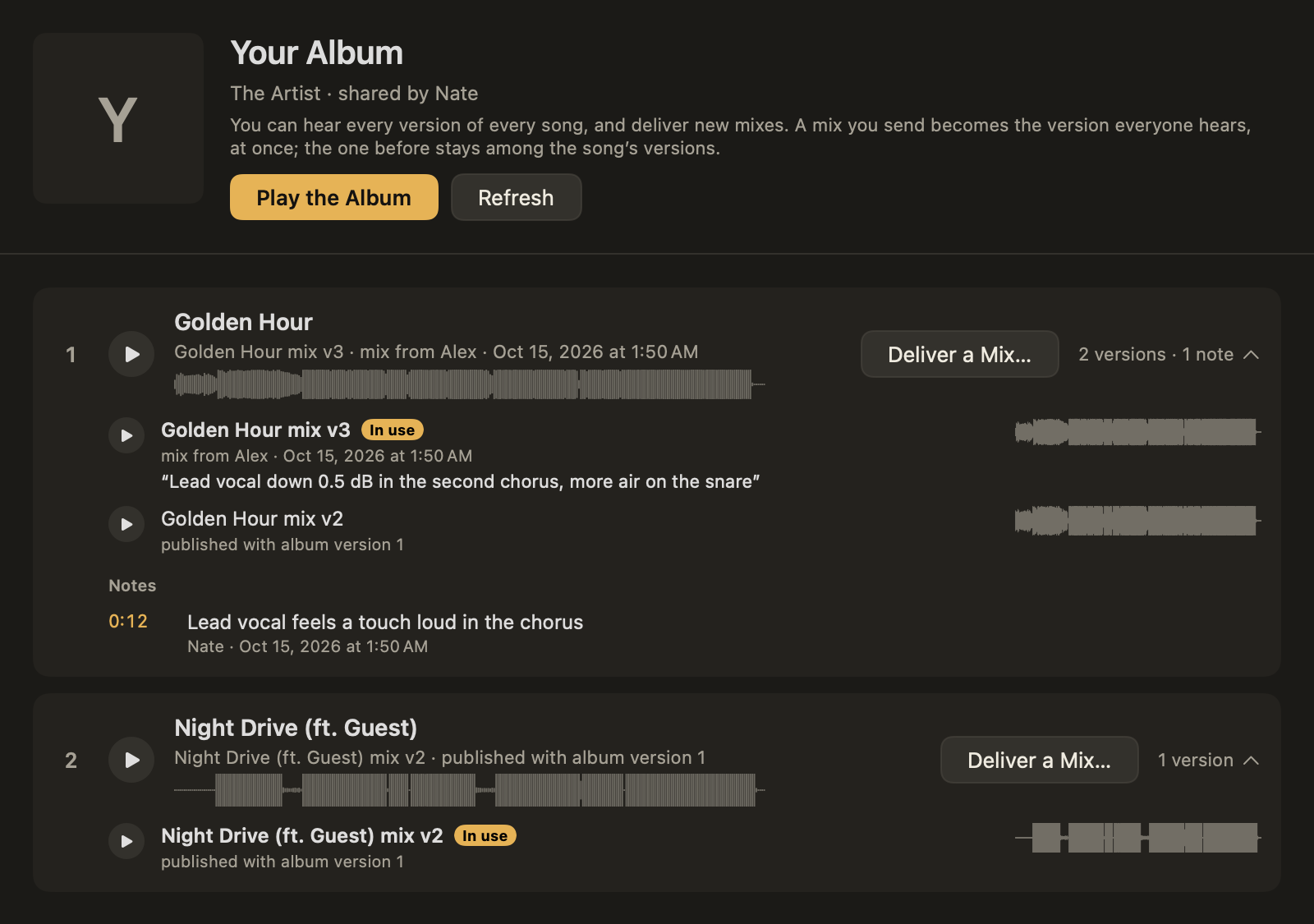
An album shared with you: every version of each song, who delivered it, and the notes. -
Deliver a mix
Drop your bounce on its song, or click Deliver a Mix…. To deliver several at once, drop them anywhere on the window: each goes to the song its file is named after (“Golden Hour mix v4.wav” goes to “Golden Hour”).
Before anything is sent, Sequence listens to the file and tells you what it finds:
- its format: sample rate, bit depth, channels and length;
- any clipping, and peaks over 0 dBTP;
- its loudness and length against the version in use;
- whether it sounds like the same song, and whether its start has moved.
Nothing it finds stops you sending. It’s there so a wrong file or a clipped bounce gets caught before anyone hears it.
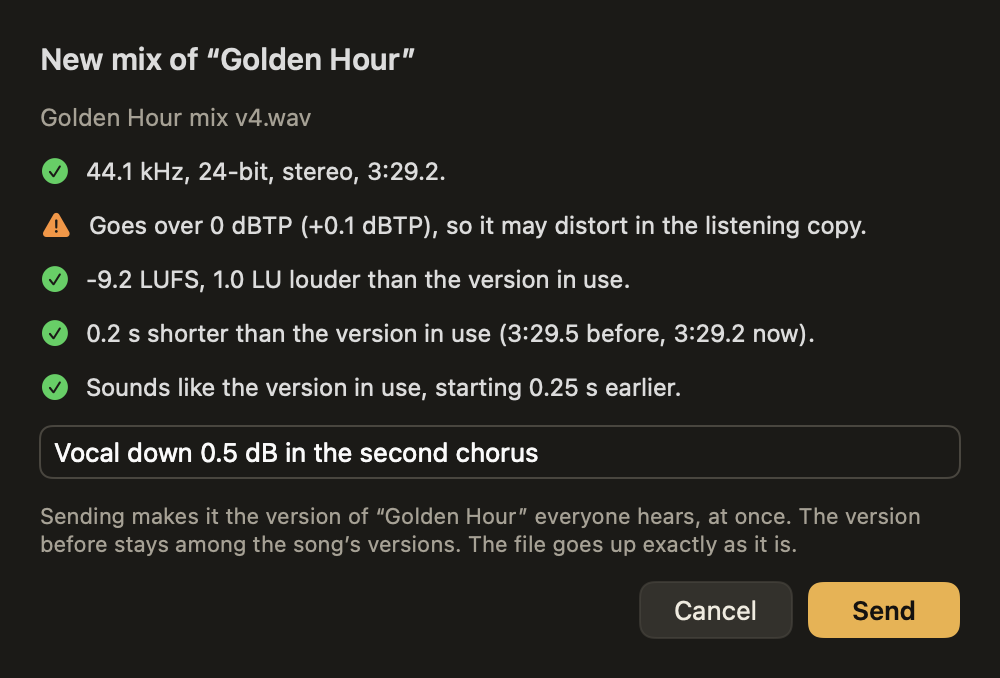
What Sequence found in a new mix, before it is sent. Add a note for everyone (what changed in this mix) and click Send.
-
That’s it
Your file goes up exactly as you bounced it, never converted. Big files go up in pieces, so a dropped connection doesn’t start it over.
A listening copy is made from it, and it becomes the version of the song everyone hears, straight away. Your earlier mixes stay among the song’s versions.
On the album owner’s Mac, Sequence takes your mix into the album project by itself, lined up with your previous mix to the sample even if the bounce starts earlier or later. The album’s mastering goes on from there.
Good to know
What should I send?
Your bounce, as a WAV or AIFF file at the session’s sample rate and bit depth. Sequence keeps exactly what you send. A compressed file such as an MP3 can be sent too, but Sequence will point out that the bounce is better.
How should I name my files?
After the song, plus whatever you like: “Golden Hour mix v4.wav”. Then you can drop several on the album window at once, and Sequence warns you if a file’s name points to a different song from the one you dropped it on.
I sent the wrong file.
Open the song’s versions and put the right one back in use: it changes for everyone at once. Then send the right file. Every mix stays among the song’s versions, so nothing is lost either way.
Who can hear my mixes?
Only the people invited to the album. The full-quality file can be fetched only by the album’s owner and its editing collaborators; everyone else hears the listening copy.
The link says it has run out, or doesn’t work.
Links can be made to expire, or to work for a set number of people. Ask whoever sent it for a new one.
Is there a Windows version?
Not yet. Sequence for Mac needs macOS 13 or later, on Apple silicon or Intel. To listen without a Mac, use Sequence for iPhone.
How do I get updates?
Sequence for Mac looks for a newer version by itself and offers it when there is one. You can always download the latest from this page.